

Updated on October 21, 2026 by Samantha Yeo
With BandLab Mastering, our goal has always been simple: making mastering music as effortless as possible. Just upload your track, pick from 4 free presets, and achieve a release-ready sound with ease. We even have a video export feature for creators who want audio-enhanced videos for TikTok, Instagram, and YouTube.
Want more control over your final sound? Access 4 bonus presets and easy intensity controls with BandLab Pro. And with BandLab Max, you’ll unlock advanced features like Mastering EQ to fine-tune your tone, plus Reference Matching to match the sonic profile of an imported track.
Explore BandLab Mastering upgrades
1. Enhance your tracks with 4 bonus presets
Available with BandLab Pro and Max
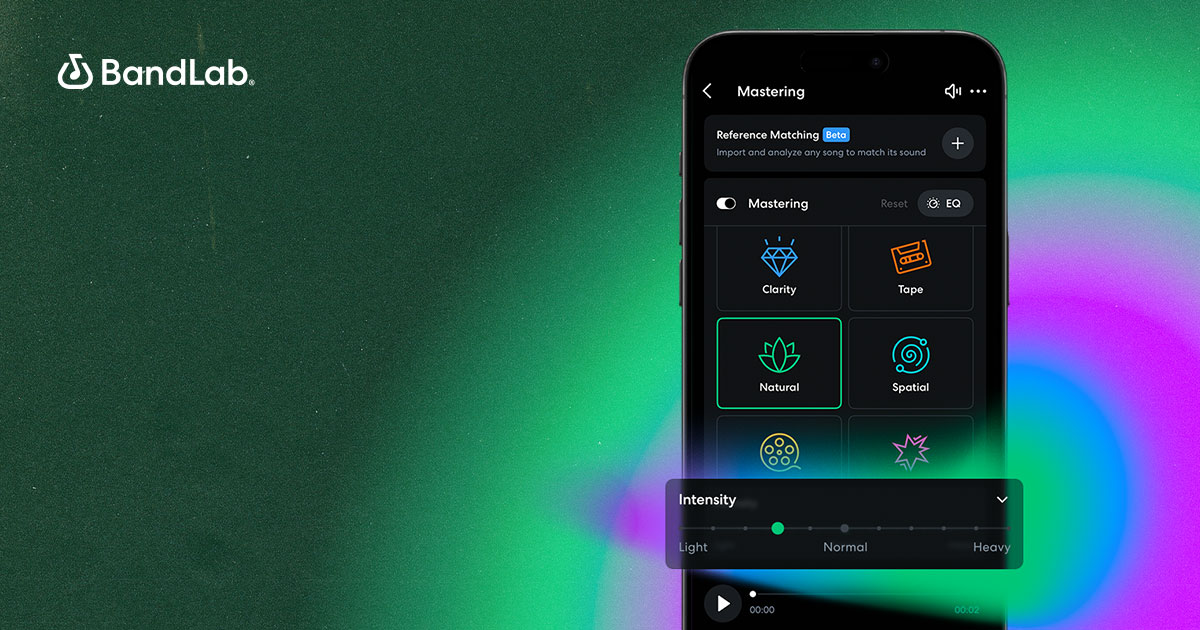
Members get four exclusive mastering presets – Natural, Cinematic, Spatial, and Punch – on top of four existing free presets – Universal, Fire, Clarity, and Tape.
These presets were designed in collaboration with Grammy-winning, multi-Platinum audio experts like Mandy Parnell, Mike Tucci, Maria Elisa Ayerbe and more. Read on to see how they can work in different ways to enhance your tracks.
- Universal – Maintains dynamics and tones across rock, pop, electronic, and alternative music
- Fire – Provides punchy lows and clear midrange for trap, experimental, and reggaeton tracks
- Clarity – Sharpens highs and enhances details in classical and R&B mixes
- Tape – Adds warm tape saturation to alternative, indie, jazz, and rock tracks

- Natural – Preserves the original tone of acoustic or natural-sounding mixes while enhancing clarity
- Cinematic – Emphasizes the punchy low-end and preserves dynamic range in orchestral and film music
- Spatial – Expands stereo width using spatialization effects like Stereowise
- Punch – Adds impact and definition to hip hop and rap tracks – an alternative to the Fire preset
2. Shape your sound with preset intensity controls
Available with BandLab Pro and Max
Experiment with preset intensity controls to achieve your desired sound. Find the bass too overpowering with the Fire preset? Dial back its intensity by dragging the slider to the “Light” setting. Want more tape saturation to come through in your mix? Crank the Tape preset up to the “Heavy” setting. Here’s how to get started!
First, import your audio file into BandLab Mastering.

You’ll find the preset intensity controls beneath each selected preset on BandLab mobile, and above each preset on the web version!
Choose a preset and adjust its intensity using the slider. Find the bass too overpowering with the Fire preset? Dial back its intensity by dragging the slider to the “Light” setting. Want more tape saturation to come through in your mix? Crank the Tape preset up to the “Heavy” setting.
If that doesn’t quite hit the mark, easily find your sweet spot by toggling between levels. For a balance between the “Normal” and “Heavy” settings, just adjust the slider until you land on the ideal intensity. Like what you hear? Hit export!

3. [NEW] Finetune your tone with Mastering EQ
Available with BandLab Max only
Once you’ve selected your Mastering preset and dialled in the right intensity, tap the EQ button in the top right of your screen. From there, use the three-band controls to fine-tune your tone before release.
Adjust lows, mids, and highs to shape your sound exactly how you want it. Want a little more warmth? Lift the lows. Need more clarity in the vocals? Nudge the mids. Chasing that bright, polished finish? Bring up the highs.
4. [NEW] Match a song’s sonic profile with Reference Matching
Available with BandLab Max only
Want your new master to mirror a specific track in your catalog? Select Reference Matching, import your track, and get your new track mastered to match its sound.
The tool will analyze the track’s sonic profile, then automatically select a Mastering preset, adjust the intensity, and shape the EQ to match the overall tone and frequency balance. It’s a useful way to give your next EP or album a more unified sonic identity.
Ready for a more flexible mastering experience? Sign up for membership to unlock these BandLab Mastering upgrades. Plus, access 50+ pro creator tools, artist services, and platform perks to propel your creator journey. Not ready to commit? Start your 3-day free trial to try all these perks for free!
About BandLab
BandLab is the social music platform and DAW where anyone, anywhere, can make music on any device, collaborate with other creators, and share it with the world.


