


Updated on October 21, 2026 by Samantha Yeo
Achieving a great guitar tone isn’t just about which effects you use, but where you place them. If your sound feels flat, muddy, or isn’t responding how you want, your sequence of effects could be working against you.
In this guide, we’ll break down how a guitar effects chain works, the standard order most creators rely on, and how to quickly build a chain that fits your genre.
Skip ahead:
- What is a guitar effects chain?
- The standard guitar effects chain order
- Guitar effects chains by genre
- Build a guitar effects chain in seconds
What is a guitar effects chain?
A guitar effects chain is a series of audio processors applied in a specific order. Along the way, every effect processes that signal before passing it to the next effect in line.
Because of this, changing the order of your effects can dramatically alter your tone. That’s why two guitarists can use the exact same effects and settings yet end up sounding completely different.
The standard guitar effects chain order
Most great guitar tones start with the same basic guitar effects chain, making it a solid foundation for almost any genre.
1. Compression – Smooths out your playing dynamics by boosting quieter notes and taming louder peaks, creating a more consistent signal for the rest of the chain.
2. EQ – Includes wah pedals, auto-wahs, and EQs. These effects generally perform best early in the chain, where they can shape your core tone before distortion and other effects are added. Check out tips on guitar EQ.
3. Gain – Overdrive, distortion, and fuzz add saturation, sustain, and harmonic richness to your sound.
4. Modulation – Chorus, phaser, flanger, tremolo, and similar effects add movement and texture. Placing them after gain allows them to work with a fuller, more harmonically rich signal.
5. Time-based – Delay and reverb come last, allowing them to repeat and enhance your finished tone rather than every individual effect that comes before them.
The same order applies whether you’re on a physical board or working entirely in a DAW like BandLab.
Effects chains by genre: What changes and why?
The standard order is a foundation, and different genres can bend the rules in predictable, intentional ways. Here’s how you might build your guitar effects chain across four common styles.
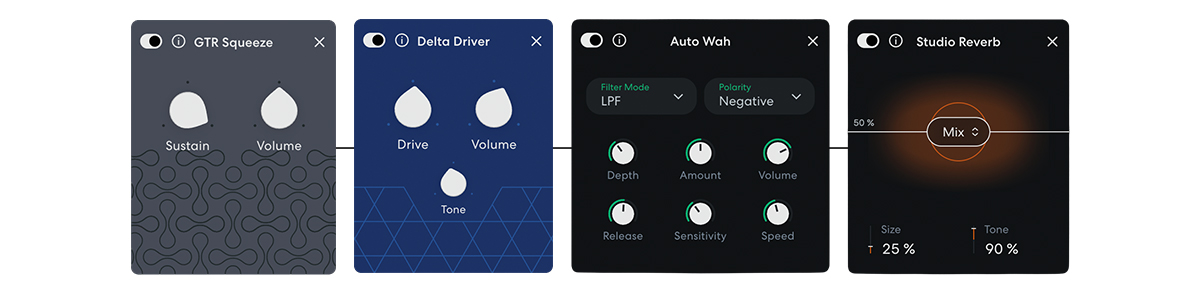
1. Blues
If you’re chasing expressive blues tones, keep your chain simple: A compressor for smooth attack, a light overdrive or boost (often a Tube Screamer-style overdrive) for warmth, and perhaps a touch of reverb at the end.
The gain stage is kept clean to moderate: you want to hear the pick attack and the note decay. A wah effect is common, and it almost always sits before the overdrive for that vocal, expressive sweep.
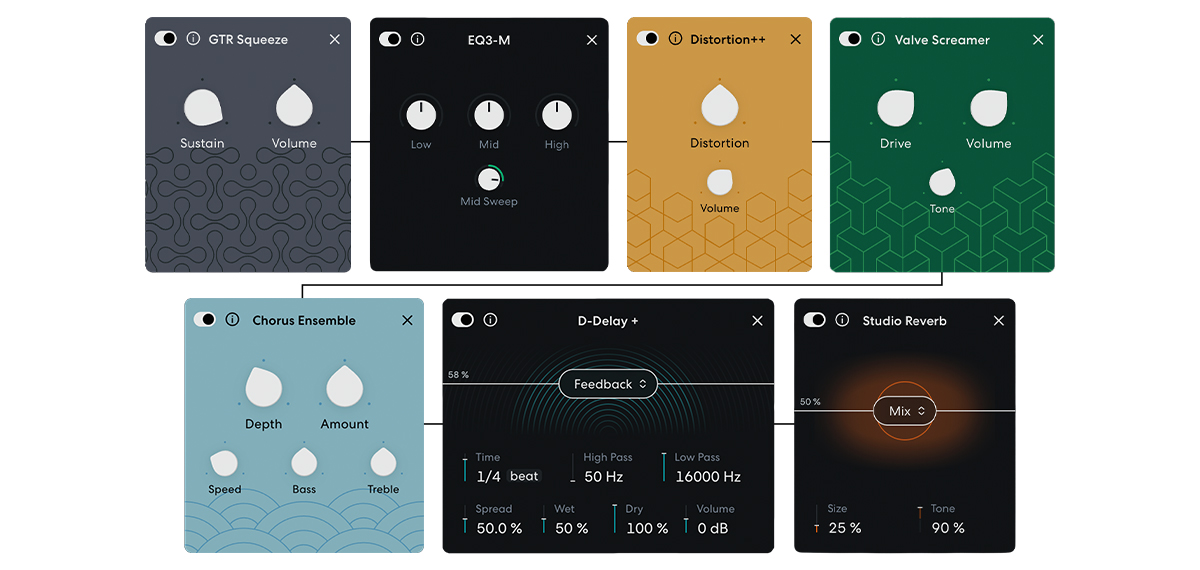
Classic rock and hard rock chains get more aggressive in the gain stage but still follow the standard order closely. A boost or overdrive may stack to push the gain harder. Modulation effects (like chorus and phaser) come after the gain stage to add width without muddying the crunch. Delay is used sparingly; slapback and short echoes are common. Reverb tends to be subtle, applied at the very end of the chain.
3. Metal
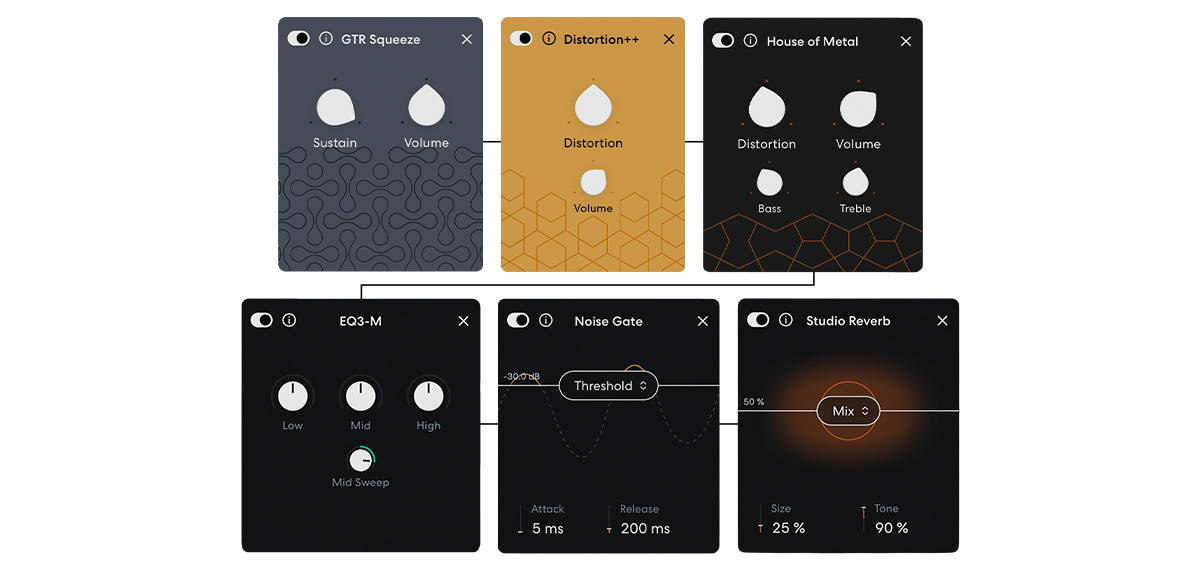
For metal, the goal is tightness. Every stage before your distortion should help keep the signal clean, controlled, and articulate.
A noise gate often appears at the end of the gain stage to silence unwanted hum between notes and clamp down on the saturation.
The core gain is pushed hard, but the chain before it stays clean and controlled to maintain note definition. Modulation and time-based effects sit after the gain stage, adding width and space without blurring the attack.
4. Indie/shoegaze
This genre is where rules get deliberately bent. Shoegaze and dreamy indie tones often flip reverb before or into the gain stage for a washed-out, saturated texture. The ‘reverse-reverb into distortion’ technique is foundational to the genre. Extensive modulation, pitch shimmer, and layered delay sit throughout the chain.
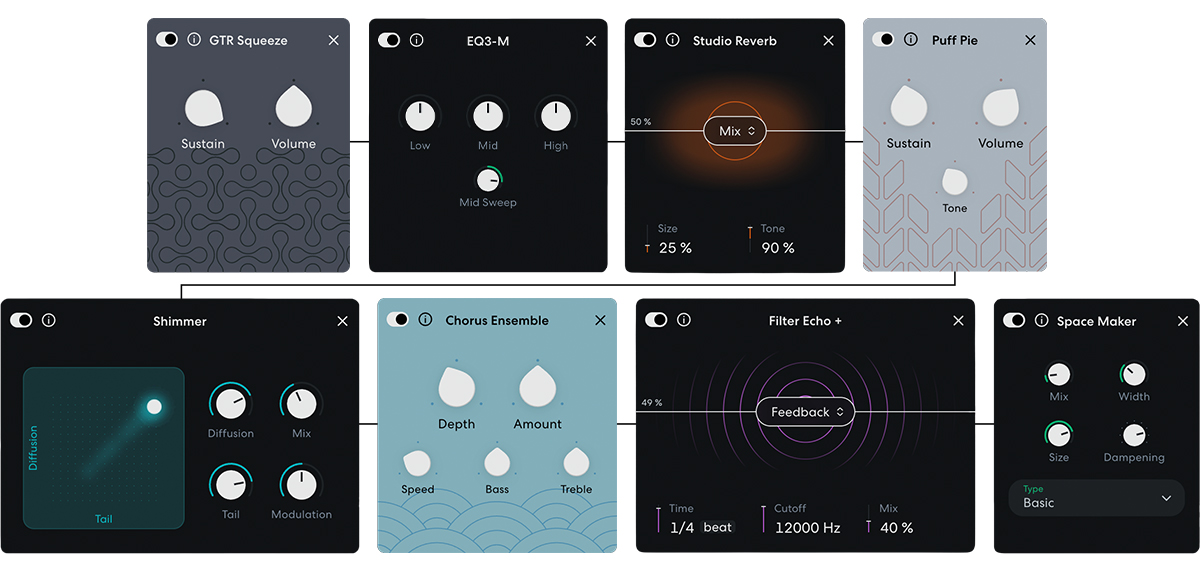
The goal is to add definition, density, and atmosphere. Once you know why certain effects are placed where they are, you can start bending the rules to create sounds that are uniquely yours.
How to build a guitar effects chain with FX Preset Generator
If you’d rather skip the guesswork, try FX Preset Generator. This AI tool on BandLab lets you describe an effect or tone in words, and instantly generates a custom guitar chain to match.
It’s a great starting point if you’re exploring guitar effects for the first time or revisiting them in a new genre. You get a working, correctly ordered chain immediately rather than starting from scratch!
All you have to do is:
- Add a new Guitar track to your project, and tap the +Fx button
- Scroll down to ‘My Presets’ and tap on ‘Generate with Prompt’
- Enter your text prompt, up to 120 characters, and tap enter
Copy this prompt and drop it into FX Preset Generator to steal this tone for your next track:
‘Gritty, overdriven guitar tone with maximum distortion’
Now that you know the basics of the guitar effects chain order, put what you’ve learnt into practice. Open BandLab and start stacking effects, or jump straight in with FX Preset Generator and see where it takes your sound.
About BandLab
BandLab is the social music platform and DAW where anyone, anywhere, can make music on any device, collaborate with other creators, and share it with the world.


